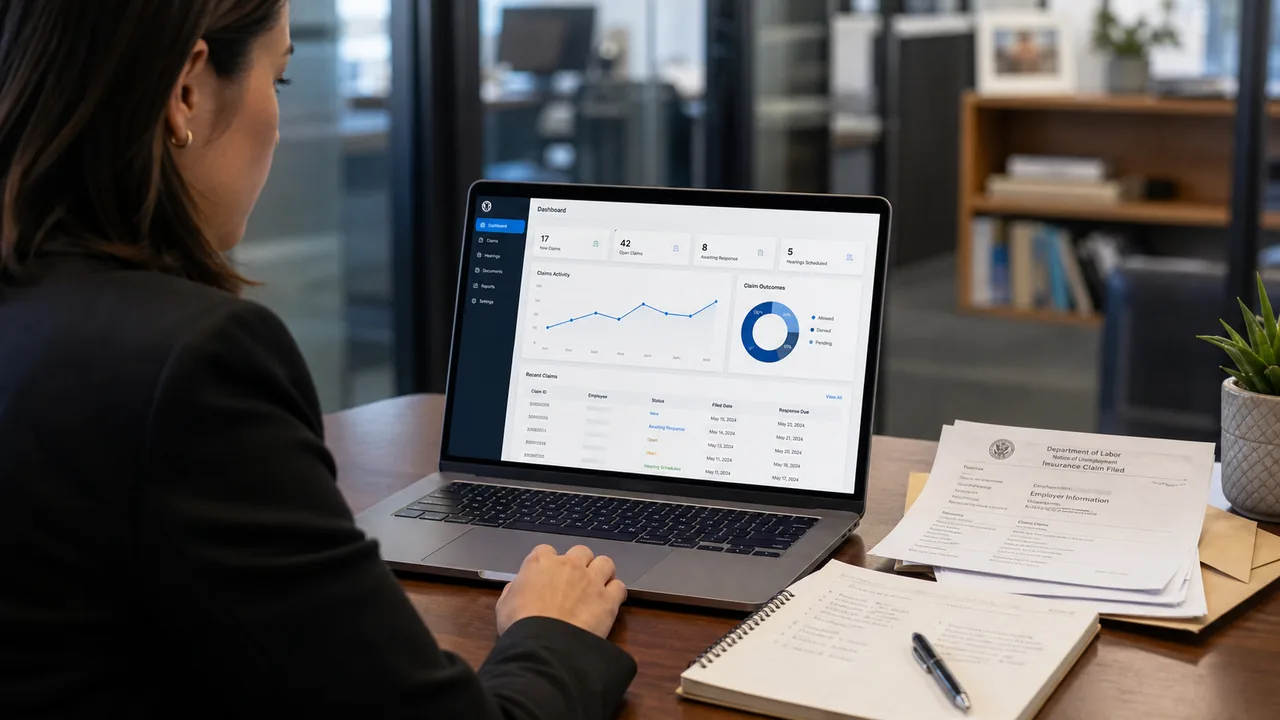
Most claims management platforms are built to report on what happened. The USC Employer Portal is built for what needs to happen next.
That distinction matters. Generic reporting tools show you historical data: how many claims were filed, what the status is, what your charges are. They're backward-looking. The Portal is forward-looking, designed to help enterprise clients stay ahead of claims before they become expensive problems.
Here's what you get, and how it works.
Real-Time Claims Dashboard
The moment a claim is filed with any state agency, the Portal captures it and routes it to your dashboard. You see:
- Claim Summary: EIN, claimant name, separation date, weekly benefit amount, anticipated duration
- Status Timeline: Filed date, determination date, appeal deadline, hearing scheduled date (each timestamped)
- Next Action Required: What you need to do, by when. Protest? Respond to agency? Prepare for hearing? The system flags it.
- Financial Impact Preview: Estimated total charge, impact on your SUTA rate, comparison to your experience average
You can filter by EIN, state, separation reason, status, or deadline urgency. If a protest deadline is within 7 days across all your accounts, one click shows you every claim that needs action.
The Portal sends automated alerts 14 days, 7 days, and 3 days before deadlines. You can set alert preferences by role (CFO sees financial exposure, HR sees action items, Legal sees hearing dates). No more missed windows.
Hearing Schedule & Preparation Workspace
When a claim moves to hearing, the Portal becomes your war room. It gives you:
- Hearing Details: Date, time, location, hearing officer name, testimony format (video, phone, in-person)
- Document Upload & Organization: Drag separation letters, performance reviews, supervisor notes, and any supporting evidence into a secure folder. Everything is organized and timestamped.
- Witness Management: Add your witnesses (supervisor, HR rep, others), their availability, and what they'll testify to. The system confirms receipt and tracks preparation status.
- Hearing Notes & Outcome Tracking: Post-hearing, log the outcome, hearing officer ruling, and any next steps (appeal, rate calculation impact).
Your hearing representative (internal or USC) has access to all documents and witness information. You can share with legal counsel for case preparation. Everything is discoverable and audit-ready.
Charge Analysis & SUTA Rate Impact
Every claim has financial impact. The Portal quantifies it:
- Claim-Level Charge: For each claim, the Portal calculates the potential charge based on benefits paid and your state's cost allocation method. It updates as benefits are paid out.
- Experience Rating Preview: Based on your current and pending claims, the Portal models your experience rating in the next rate calculation year. Show it to finance: "If these 10 claims are denied, your rate drops 0.4%." That's the ROI on hearing defense.
- Multi-EIN Aggregation: If you have 50+ EINs, the Portal rolls up charge exposure by state, by company, or by separation reason. Finance can see total liability across the entire portfolio.
- Rate Optimization Recommendations: The Portal flags opportunities (group account filing, rate audits, alternative experience rating methods) that could reduce your rate.
You can export charge data in any format your finance team needs. Month-end reconciliation is automated.
"We manage 35 EINs across 12 states. Before the Portal, pulling together all claim data for a rate audit took three weeks. Now it's one click. That visibility alone has saved us $340K in unnecessary SUTA payments because we caught two group account opportunities we didn't know existed."
Document Management & Separation Response Workflow
When an employee is separated, the Portal workflows you through the documentation process:
- Separation Intake Form: HR fills out a simple form: employee name, separation date, reason, supporting documents. The form auto-generates a standardized separation letter and uploads it to the claim file.
- Documentation Checklist: Based on separation reason, the system prompts for required documents: progressive discipline records, performance reviews, exit interview, etc. As each is uploaded, the system marks it complete.
- State Agency Correspondence: When a state agency sends you a letter requesting information (wage verification, witness list, rebuttal statement), the Portal logs it, flags the response deadline, and lets you draft your response in the system. Everything is timestamped and archived.
- Audit Trail: Every document, every edit, every decision is logged. If a hearing officer asks "When did you receive this determination?" or "Did you respond to this agency letter?", you have documented proof.
Reporting That Actually Helps
Most platforms generate reports that no one reads. The Portal generates reports that drive decisions:
- Executive Summary: For CFO/CEO: total claim volume, benefit charges YTD, SUTA rate impact, comparison to prior year
- Operations Report: For HR/operations: claims filed, determinations received, protests filed, win rate by state, documentation compliance
- Legal Report: For in-house counsel: hearing schedule, cases in progress, legal precedent flagging (new state rulings that affect your active cases), appeal options
- Benchmark Reports: How you compare to industry peers on claim volume, win rate, and SUTA rate. Context matters.
All reports are customizable. You can drill down to individual claims or roll up to portfolio level.
Integration with Your HR & Finance Systems
The Portal connects to your HRIS and payroll system via API, so:
- Separation event data flows automatically from your HR system into claim intake
- Payroll records (wage history, hours worked) auto-populate protest responses
- Benefit charges flow to your finance system for accrual and cost allocation
- You don't manually re-enter data across systems
No integration? The Portal has manual import/export workflows so you're not stuck. But most enterprise clients prefer API integration for accuracy and speed.
Security & Compliance
Claims documents contain sensitive employee and financial data. The Portal is built with:
- Role-Based Access: HR sees HR-related documents. Finance sees charge/rate data. Legal sees hearing materials. Executives see summaries.
- Audit Logging: Every view, every download, every edit is logged with user ID and timestamp
- Encryption: Data in transit and at rest uses AES-256 encryption
- Compliance: Portal is SOC 2 Type II certified and compliant with GDPR/CCPA for any employee data
Most tools are designed by engineers for engineers, or by accountants for accountants. The Portal is designed by practitioners, former HR, legal, and operations teams at USC, who know what you need to do tomorrow. That's why it actually gets used.
Getting Started: Onboarding & Support
USC includes Portal access and training with all managed services contracts. During onboarding:
- We import your historical claim data (12-24 months)
- We map your system to Portal workflows (integration with HRIS, finance system, etc.)
- We train your team (2-3 sessions, 60 min each)
- We monitor early usage and refine settings based on feedback
The Portal is included in your service fees. No additional cost. No seat licenses.
Request a Portal Demo
Enterprise clients managing 10+ EINs or 100+ claims/year benefit most from the Portal's visibility and workflow automation. We can walk you through a live demo on your data (anonymized) to show how it would work for your operation.
Schedule a Portal Demo →